
Congratulations – you’re engaged! Now it’s time to plan a wedding. This can be as simple as heading to the courthouse or as complicated as a multi-week event with hundreds or thousands invited. No matter what you’re doing – there are a lot of steps, expectations, and logistics to manage. So… I MADE A FREE SPREADSHEET. The spreadsheet has steps and instructions in it and should be an amazing resource, but I’m also putting together this post to add some extra details.
The steps in this sheet can be done over the course of a month or more – this does NOT need to be done all in one big planning session. Don’t burn yourselves out at the start!
STEP #1
Decide what kind of wedding you want. Go ahead and read through this post to hopefully get de-influenced from years of what you’ve seen in the media, and then sit down to figure out your priorities.
- How many people do you want to share your in person wedding with? What number makes you excited and not stressed? This can be no one, or 600 people, or any other number that makes sense to you
- Where do you see the day happening? Where you grew up, where you live now, a place special to the two of you?
- What “vibe” are you after? A breezy day by the beach, a grand cathedral, in a cute garden surround by nature, in a beautiful ballroom, in a room at your favorite brunch place having waffles, or a rustic barn with lanterns, or maybe a big tent under the stars
- Pick THREE things that each of you really care about. That might be everyone having fun, or gorgeous flowers, or a beautiful view. It might be high quality drinks or really good food. It’s also ok if these change over time and it’s ok if you have the same or different priorities
STEP #2
Now it’s time to figure out the money. Whether one of you has been saving up a wedding fund, or parents / relatives want to help, or you’re going to save money over time – figure out how much money there is. I am not a financial professional and I don’t know your life BUT DO NOT PUT ANYTHING ON A CREDIT CARD THAT YOU CANNOT IMMEDIATELY PAY OFF. They charge massive interest fees and it isn’t worth it. If you really want to spend the money, then have a longer engagement and save up!
Now it’s time to actually use the spreadsheet!
- Make a NEW Gmail account for you both that you will use for all wedding things
- Make a copy of the spreadsheet and save it to your google drive on the new account
- Go into the Guest List tab and enter in EVERYONE you can think of that you might want there. Give them priority 1 if you 100% want them there, and then go down 2 through 5 for guests that are less important to invite (with 5 as lowest priority)
- Go into the Budget Builder tab and enter the budget you have decided on. Then pick three things that matter the most. (A nice view would mean the Venue, pretty photos would be a photographer, etc). If there are any things that don’t matter to you – like custom decor, or a videographer, set the % to 0 to remove them from the budget.
STEP #3
Now it’s time to fine tune that budget, your priorities, and your expectations! Plus TONS of research.
- Decide if you want a wedding planner. They come in a WIDE variety of price points and serve different functions. They usually also come with recommend venue and vendor lists and can make your research go a lot faster. (Mine also had a few discount codes that saved me a little money). If you’re going to do it yourself, just know that you may need to lean on friends and family for a few day of logistics.
- Check out the Cost Cutting tab for ideas that might help your budget go further. ESPECIALLY tactics to cut your guest list. This can lower your catering & bar bill and allocate more money to other vendors.
- Research, research, research. The Vendor List has descriptions of a lot of vendor types. Then, you’re going to want to go on Wedding Wire (it more often lists prices, while The Knot is less accurate) and find vendors and their approximate pricing for the area you want to get married in
- Anytime you find someone that looks amazing and might be in your budget, save them in your Vendor List tab! If you seem unable to fund anyone in your price range, it’s time to think about DIY or deeper research.
- Make social media work for you – vendors have to pay to advertise on the main sites, which means the less booked and maybe more affordable ones are just trying to hustle on social media. If you find venues you like, they’ll often tag their vendor teams in their posts, and you might find some good deals!
Now for a real life example – many florists when we were looking had an $8000 minimum to even work with them, and that was a lot more than I was willing to invest in flowers. I spent a long time looking into rented, fake, and bulk wholesale DIY options because I didn’t think I could afford a florist. However, I didn’t want us to have to deal with set up or potential delivery delays so I kept digging and our venue had a recommended florist who had a business outside of just weddings. This means they made their money from a storefront and didn’t rely solely on weddings to pay their bills – which meant they gave us a quote only on the flowers we wanted and not on a minimum they had set. We saved a ton and no manual labor needed! (And they are not on Wedding Wire or The Knot).

STEP #4
Drill down on the “vibe” a little bit more! You’ll want to pick your wedding colors, time of day, overall inspiration BEFORE you start touring venues and talking to vendors. If a photographer only shoots light and airy photos and you want your wedding to look like it fell out of a 1920s speakeasy, they may not be the right photographer for you.
- Check out the Inspiration tab to see a few quick ideas and then fine tune from there
- The Floral List also shows a lot of common arrangements and options, which will also help you see what flowers you might like

STEP #5
Time to go venue hunting! This is one of the BIGGEST decisions and there are a million factors that go into it. You have to think about the atmosphere you want, how easy it is for your older guests to get around, whether or not they do the food on site or you need an external caterer, how does parking work, are the ceilings tall enough, is there a rain plan…
- PRINT THE VENUE CHECKLIST TAB and bring it to every single venue. And ask questions until every single thing on the list has been covered. Without shame. We did this at 5+ venues and none of them minded it (and were also impressed, which got us a discount at the final place we chose!)
- Example: Some venues charge you for the rain plan – fees to move the ceremony inside, or set up a tent etc. Make sure you know what those fees are and what the deadlines are for deciding inside vs outside
- Example: Some venues will give you a quote, but not include a 22% service fee that they charge to cover admin costs and tipping their staff
- Example: External caterers are (anecdotally) cheaper, but the food is made elsewhere and re-heated on site. On site chefs can be more expensive, but the food is fresher and might be easier to customize for dietary restrictions
- Example: Some venues do not allow open flames – you either have to use fake candles or all candles need to be in hurricanes (glass surrounding containers)
- Example: What time can you and your vendors access for set-up? What time is the bridal suite available? Some places let you in at 8am, and some places do multiple weddings a day and you don’t have access to anything until 4pm
- Example: Most venues carry all forms of insurance needed, but some do require that you purchase an extra plan to cover your event
- Example: Have you ever been to a wedding where you can’t hear a thing during the ceremony? Check and see if your venue has an A/V system, or if you’ll need to ask your DJ to bring it for ceremony audio!
- Example: Some venues don’t allow fake flower petals (because of clean up outside) and some venues don’t allow real flower petals (because of clean up inside) – make sure to check!
- Example: One venue wanted to charge us $2.50/person for silverware and $1.50/person for water at the tables during dinner.
- ASK ALL THE QUESTIONS AND AVOID HIDDEN FEES. Please. I beg you.
STEP #6
It’s time to start spending money, booking vendors, signing contracts, and locking things in. This is the trickiest part of the spreadsheet where it’s the easiest to mess up the formulas.
- Change the names to the names of the people who are paying for stuff. Keep them simple, short, easy to type. (Numbers in there now are made up, add your own!)
- You can leave the names alone / generic too, just WHATEVER YOU WRITE in Column “I” – make sure you keep using. (In this case “Bride” and “Groom” etc)

- Any time a vendor gives you a quote and you agree and sign, track the quote in the “Total” column. If you have PAID anything, like a deposit to reserve your date, note it in the “Deposit/Payment” column and write the EXACT NAME (from above) of who paid for it. The subtotal section will auto calculate who has paid for what and how much money has still been owed.
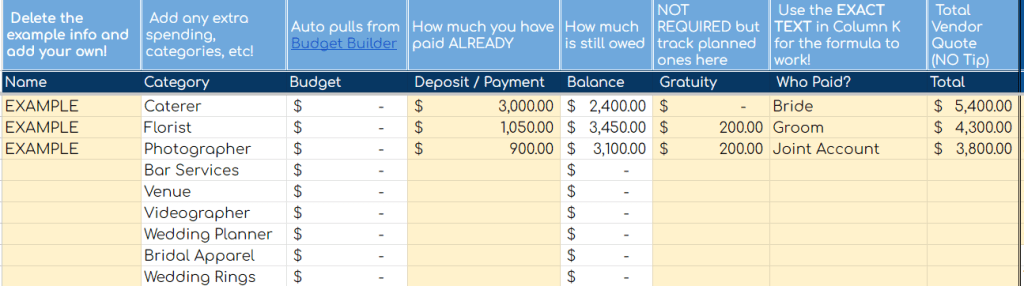
- You’ll pay a lot of deposits in the first couple months, and then the balances will all be due about a month before the wedding. This will help keep your spending in check and make sure you remember how much is still owed!
EVERYTHING ELSE
You should be off to the races now! Remember to constantly check in on each other, evaluate your priorities, read contracts closely, and have fun! The Check List will take you through tons of steps and help you break down tasks by month / week.
Weddings are expensive enough – so I will keep writing articles and updating the spreadsheet so it is available for free for anyone who needs it! But in this economy, I will unashamed be plugging a few ways to support us!
- SHARE THIS POST & SPREADSHEET WITH ANYONE YOU CAN THINK OF. Anytime. Any stage of planning.
- Send me a tip on PayPal or Ko-Fi
- Buy your everyday essentials from my Amazon Storefront – it doesn’t cost you anything extra, and Amazon gives me a small commission!
- Use my code REINESSA12 to buy anything from Steelseries, (gaming gear) get 12% off, and I earn a small commission
- Follow any of my social media and interact with my posts! (Even if it’s just a like and commenting with an emoji, it makes a difference!) Instagram, Twitter, YouTube

Leave a comment